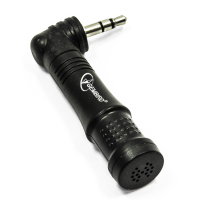
Gembird 3.5mm Mini Compact Laptop Notebook Microphone
GET MORE FROM YOUR LAPTOP PERFECT FOR TRAVEL LOW NOISE RECORDING ROTATABLE FEATURES Omni-directional microphone for notebooks Compact size ideal for travelling Low noise audio recording Plugs into a standard 3.5mm microphone jack Windows 7 General Microphone Enabling Help:If you have no recording devices shown in the recording tab, you can enable them by :
START MENU > CONTROL PANEL > HARDWARE & SOUND > SOUND > MANAGE AUDIO DEVICES > RECORDING TAB > RIGHT CLICK IN BLANK BOX & CHECK "SHOW DISABLED DEVICES.
Right clicked on the recording device that was now showing and select enable and this device.
Visit the Kenable Ltd website for more information on Gembird 3.5mm Mini Compact Laptop Notebook Microphone
ENQUIRY FORM